
Cosplay and roleplay are all about transformation—becoming someone else, stepping into a character’s world, and expressing creativity in a whole new way. Costumes, makeup, and props usually take center stage, but one detail often gets overlooked: the voice. Imagine dressing up as your favorite anime hero or fantasy character, only to have your real-world voice not match the look. With CapCut’s Voice Changer, you don’t need expensive equipment or voice acting experience to sound like your character. This free, beginner-friendly video editing software lets you transform your voice in just a few clicks, adding depth and authenticity to cosplay and roleplay content. Whether you’re creating TikToks, YouTube skits, or Instagram reels, adding the right voice can turn a good video into something unforgettable.
Why Use CapCut’s Voice Changer for Cosplay and Roleplay?
- Bring Characters to Life
The magic of cosplay lies in stepping into the shoes of your favorite characters. By adjusting your voice to sound deeper, higher, robotic, or even magical, you can match the tone of your character and create a fully immersive experience.
- Add Humor and Entertainment
Voice changers aren’t just for serious roleplay—they’re also perfect for comedy skits. Imagine parodying a superhero with a squeaky voice or giving your villain an overly dramatic echo. The possibilities for funny and engaging content are endless.
- Save Time and Money
Traditionally, changing your voice might require professional voice actors or complex audio editing software. With CapCut Video Editing Software, you get built-in voice effects for free, and the process takes only minutes.
- Stand Out on Social Media
Millions of cosplay and roleplay videos flood TikTok and YouTube every day. Using unique voice effects makes your content more eye-catching, helping you build a stronger connection with your audience and stand out in your niche.
Popular Ways to Use Voice Changer in Cosplay Videos
- Anime Characters: Give yourself a high-pitched voice to sound like a classic anime protagonist.
- Villains and Monsters: Use deeper or robotic filters for darker, more intimidating characters.
- Fantasy Heroes: Add echo or reverb to sound mystical, perfect for wizards or magical beings.
- Comedy Parodies: Mix and match voices for hilarious skits where characters sound completely different from what is expected.
How to Use CapCut Voice Changer for Cosplay and Roleplay Videos
Using the Voice Changer in CapCut is simple. Here’s a step-by-step guide to get you started:
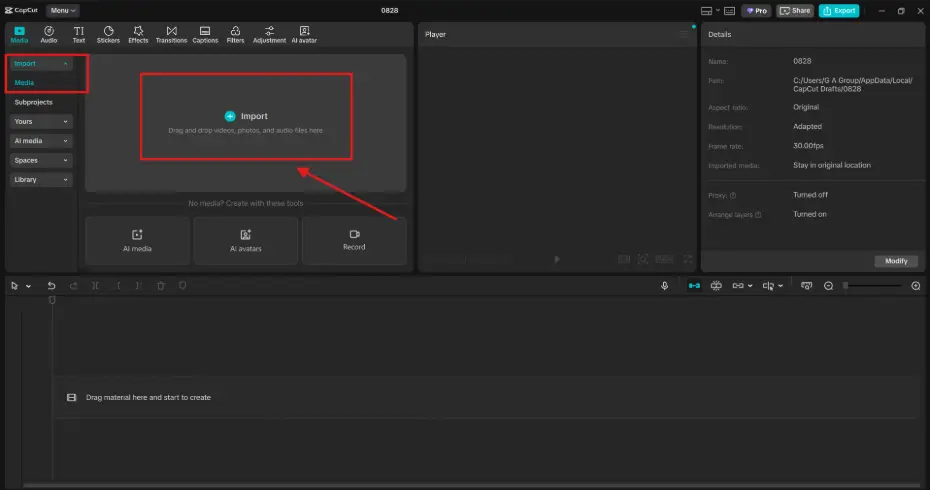
Step 1: Import Your Video into CapCut
Open CapCut on your computer or mobile device. Create a new project and upload your cosplay or roleplay video. If your video doesn’t already have recorded dialogue, you can record audio directly in CapCut or import a separate voice track. For cosplay, consider recording your lines in your natural voice first, so you can focus on performance without worrying about effects. You’ll add the transformation afterward.
Step 2: Apply the Voice Changer Effect
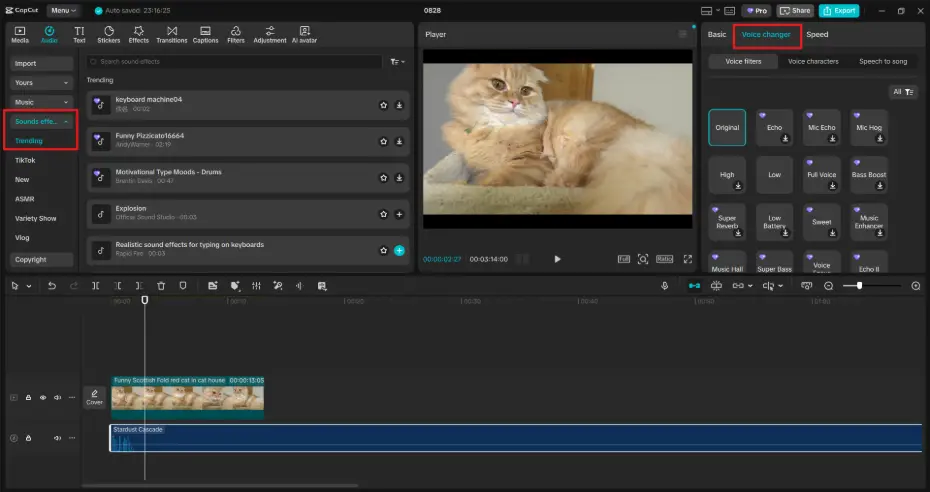
Select the audio clip (your voice recording) on the timeline. Tap on “Voice Effects” or “Voice Changer” in the editing toolbar. Browse through the list of available effects such as “Deep,” “Robot,” “Chipmunk,” “Echo,” or “Electronic.” Click on the effect that best fits your character and listen to the preview.
Example:
- Playing a wizard? Try a deep or echo effect.
- Cosplaying an anime character? Try a higher-pitched voice.
- Doing a comedic skit? Go with a robotic or chipmunk voice.
CapCut AI tools such as AI Video Generator, Online Photo Editor, and Text to Speech allow you to experiment easily, so don’t be afraid to try multiple effects before settling on one.
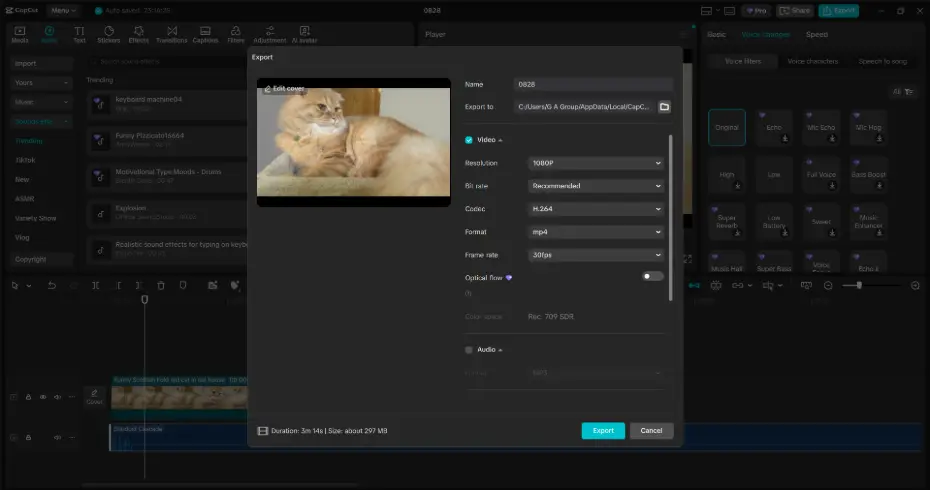
Step 3: Refine and Export Your Video
After choosing a voice effect, adjust the timing of the audio to match your character’s lip movements. Combine your new voice with other edits—such as background music, sound effects, or text overlays—to enhance storytelling. Once satisfied, tap Export, choose your desired resolution, and share your cosplay video on TikTok, YouTube, or Instagram. If you’re working on a group roleplay, you can apply different effects to each character’s lines, creating a diverse cast of voices with just one editing tool.
Why CapCut Is Perfect for Cosplayers and Roleplayers
Unlike complex editing software that requires training, CapCut offers an easy-to-use interface with powerful features. You don’t need to be a tech expert to get professional-looking results. Beyond the Voice Changer, CapCut also provides:
- Text-to-Speech: Convert scripts into character voices instantly.
- AI Effects: Add cool filters or animated backgrounds.
- Transitions and Stickers: Enhance the visual appeal of your roleplay videos.
- Free Templates: Start quickly without editing from scratch.
This makes CapCut a one-stop solution for creators who want to focus on storytelling and creativity rather than struggling with editing.
Conclusion
Cosplay and roleplay are all about expression, transformation, and fun. With CapCut’s Voice Changer, you can add the finishing touch that makes your videos truly come alive. From heroic anime fighters to creepy villains, or even comedic parodies, adjusting your voice can make your content unforgettable.
The best part? It’s quick, free, and requires no prior editing experience. All you need is your creativity, your costume, and a few clicks in CapCut. So, the next time you put on your cosplay outfit or prepare a roleplay skit, don’t stop at the costume. Give your character the voice they deserve with CapCut’s Voice Changer feature—and watch your videos grab attention across TikTok, Instagram, and beyond.
